

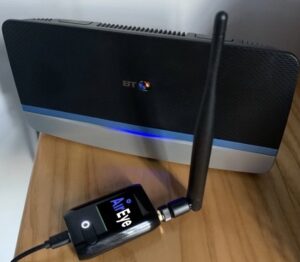
Mark Hubbard and Craig Shaw from MAPS Wireless talk about the company’s Dome for Home, a small device installed alongside a remote homeworker’s router that checks for traffic anomalies and cyberthreats.
Q: What is the Dome and why would I want to use it?
Mark: The Dome for Home is a small key-fob sized device that is installed alongside your router in the office or at home and analyses the management information on your WiFi network, to check for threats and risks. Basically, the Dome for Home keeps the bad guys away, giving Central IT full visibility of your network and helping them to remediate any attacks.
Q: So, it keeps the bad guys out of your network – how does it work?
Craig: If you go into the management dashboard you can see which access point or home router the Dome has picked up and if there is a threat. You can tell if the attackers are within 3 to 10 metres from that access point. The initial phase of the forensics will tell you where and when the attack happened.
And with that, you can dive into the full forensics of the interface, start delving into what type of attack it was, how long it’s been going on, how often, what device was attacking you and so forth…
Q: How does it work on a network? Won’t there be too much white noise?
Mark: Once you’ve reached a certain level where you’ve whitelisted all your assets and you’ve configured how you want to be alerted and on what, then any serious anomalies are highlighted. And then if you get alerted on an attack, central IT or the service provider can use the forensics to go back in and find out what’s been happening. That’s the Dome technology.
Mark: As Craig said, the big benefit is the simple ease of use once you’ve installed it. You can provision it and just leave it and let it do its job. And that’s the beauty of it; you do the installation and it’s there working in the background. You don’t need to go back and address anything else because it’s all done through the management console. It’s completely zero touch and that’s very important. It doesn’t touch your own network. It just sits there, looking at your airspace – zero touch is critical.
Q: Can you give me an example?
Mark: In this office we’re sitting here in relative safety because we know we’re protected, safe from an attacker coming in with his phone, for example, and having his hotspot switched on and delivering some kind of attack malware like a Trojan. This person could also be a guest, connecting to our network and accidentally infecting it. So, the attack could be accidental or deliberate and come from anywhere.
It often happens that companies give a visitor guest Wi-Fi access; they log in and there maybe some attack malware on their phone from a previous connection elsewhere – this alert system tells us that they’ve got their hotspot turned on and our Domes will refuse access.
Q: What about at an event? For example, exhibition centres have guest WiFi that hundreds of people log into while attending an event.
Craig: That’s when you’d use the Dome Traveler™️.
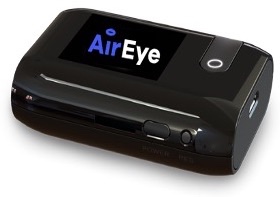
Q: Tell me more about the Traveler™️?
Mark: Say you’re at an event and someone walks in and they’ve got a sniffer on their phone or laptop to view what’s going on in the network. They could view the connection history of access points and hotspots on anybody’s phone which constantly asks for connections. They could see that I connected to my home WiFi, then spoof that. So, my phone connects to what it thinks is my home WiFi, when it’s actually the attacker’s. And then they could pull anything, even everything, off my device. The Traveler kicks me off spoofed networks and protects my devices from such attacks.
Craig: But it’s not just that. A person who is unaware of any problem could infect the network because they might have some kind of vulnerability on their network or someone is sitting in the background waiting for that occasion to occur. It could infect all the other guests’ devices on that particular network. Everyone at the event. And you’d need your Dome Traveler™️ with you to make sure that if you’re out and about, like in Starbucks, you’re protected.
Q: Can you give me an example of some nasty malware?
Craig: For example, Emotet is a malware initially aimed at banking organisations. It’s evolved to commit brute force attacks on WiFi security everywhere. It’s unbelievably scary. It uses Wifi as a transport mechanism to infect other devices. It’s a trojan that could stay sleeping on your laptop and once you connect to a corporate WiFi it’ll spring out like the Trojan Horse in the Greek legends. It’s a nasty virus that has new strains emerging constantly. And then jumps from your device and steals email attachments to add credibility to spam.
Mark: Imagine bringing your laptop to work and connecting to the wired network– and you happened to have watched Netflix on it at home and have forgotten to turn off your Wifi on the device. This effectively opens your secure, safe office environment to the world of Emotet-style malware. It might not hit you today, but it will get you at some point.
Q: But what about at home when you are on your company’s broadband network? How does that help you at that point?
Craig: The dome complements current security and adds to common security layers, VPNs, firewalls and other measures. The dome monitors, protects and reacts to anything within your airspace before that security connection is established. The Dome for Home could actually show that there’s a threat in the air space around us and it reacts to that threat.
Mark: And in terms of people working from home, if we take our corporate laptops and go home and connect to our Wi-Fi, the Dome at Home and the Traveller protect our devices. They don’t interfere with any sort of connectivity, speed and packets of data that are being sent. They don’t disrupt it. It’s Zero-Touch
Craig: It’s worth remembering that a lot of people working from home have families, kids, Xboxes, iPads etc on the Wi-Fi. The kids then go to their grandparents, connect to their Wi-Fi so their devices are spread all over the place in terms of Wi-Fi and usage. They then return home and log onto the Wi-Fi and who knows what’s on their devices. So, the Dome Traveller protects you on the go and the Dome from Home protects you when you get back home.
Q: There are a number of other products in the market. What are you doing that they’re not doing?
Mark: There are a lot of other products on the market that simply monitor what’s going on around the networks. They’re limited to monitoring, alerting and mapping the network airspace. The difference here is that the Dome controls and protects the airspace. It can kick you off the network it there’s an attack and it can apply policies to stations and access points ensuring only trusted connections.
Take, for example, you’re living in a row of houses; this device can pick up all the network traffic that’s going on, probably two or three houses on either side of you.
But you’re not interested in that. The Dome management gives you the ability to tell it you’re only interested in your own airspace and corporate devices. It’s installed to protect rather than monitor you.
Once that configuration is set, anything unusual such as next door’s printer being wide open to the world will not show up. But I want my printer protected because that could be a way for an attacker to get to my corporate devices. The Dome from Home effectively puts a firewall around your house and includes your printer or indeed any digital device, such as Alexa, on the network.
Just remember, US retail giant Target was breached via its HVAC third party vendor. The breach eventually cost the company $202 million. The Dome would have protected Target’s hacked air conditioner unit against such an attack. There’s food for thought…